Skip to Content
Skip to the ways to begin
Odoo, integrations, and custom software

Business software should
make work easier.

We sit down with your team, learn where things get stuck, and fix it. Sometimes that means setting up Odoo properly. Sometimes it means building the missing piece. Usually, it is a thoughtful mix of both.

Standard Odoo when it works Custom code when it earns its keep A system your team can own
A TYPICAL FIRST CONVERSATION “Here is the part that drives us crazy.”
“We approve quotes in email, then enter the same information again.”
“Customers call us because they cannot see what is happening.”
“This report takes half a day and nobody quite trusts it.”
What we help with

You do not have to fit your problem into a service menu.

Bring us the messy version. We will work out what belongs in standard Odoo, what needs connecting, and what is genuinely worth building.

Set up Odoo without losing sight of the business

We help make the calls that matter: what to keep standard, what data to move, how the workflow should feel, and how to launch without surprising the people who have to use it.

Talk through your Odoo plans
Build the part that is actually missing

A focused Odoo module, an internal tool, or a small product of its own. We keep the scope understandable and the code maintainable.

Tell us what the standard system cannot do

Connect the systems people are babysitting

Good integration work is quiet. Information arrives where it should, failures are visible, and nobody has to copy the same record into three places.

See a few examples

Give people a better way into the business

Customer and vendor portals, dashboards, document flows, and simple screens for jobs that should not require a manual or a training seminar.

Show us who needs a better experience
What working together looks like

Less theatre. More useful conversations.

1

Show us the messy part

A spreadsheet, a screen recording, the email thread everyone hates. You do not need to clean it up first.

2

Make the problem concrete

We trace who does what, where the information comes from, and what happens when the normal path breaks.

3

Put something real in people’s hands

We test with the people who will use it, fix what we got wrong, and ship maintainable pieces your team can understand.

Real work, made safe to share

See the operating problem and what changed.

These examples come from working systems. Identifying information is replaced, while the workflow and engineering decisions remain real.

RECENT · SALES & CUSTOMER

A return request became a guided customer workflow.

A secure form starts from the original sale, shows only eligible quantities, gathers reasons and photo evidence, and carries the request through office review, customer follow-up, instructions, and warehouse intake.

The customer and the internal team can each see what is happening, what is blocking progress, and what to do next.

Walk through the return workflow
INVENTORY & PURCHASING

A product screen became a purchasing cockpit.

Availability, kit components, reservations, stock locks, receipts, vendor context, and demand signals came together around the buyer’s next decision.

The useful answer is not “how many are on hand?” It is “what can we promise, and what should we buy?”

See the purchasing workflow
FINANCE

Statements became an operation, not a PDF button.

Preflight review, customer policies, delivery status, secure payment paths, history, and failure recovery became one visible process.

Normal accounts move quickly while unusual accounts and failed deliveries stay visible.

See the statement workflow
MARKETPLACE INTEGRATIONS

Connections became visible operations.

Account health, fulfillment paths, queues, errors, schedules, tracking, and safe recovery are visible to the people responsible for keeping orders moving.

The goal is not simply to move data. It is to make failures understandable and recovery safe.

See the marketplace workflow
SOMETHING WE HAVE BUILT Collaborative Scanning

Warehouse teams should not have to take turns on one transfer. We built an Odoo 19 module that lets several people scan together, keeps a clear audit trail, handles lost connections safely, and falls back to standard Odoo when needed. It is a warehouse product, but the thinking behind it—shared work, permissions, recovery, and understandable failure states—applies well beyond the warehouse.

Built for Pro-A-Motors

The work behind the workflow.

Warehouse interfaces, purchasing logic, customer journeys, financial workflows, business documents, integrations, and upgrades. Explore thirty case studies by the business area they support.

Explore by business area →
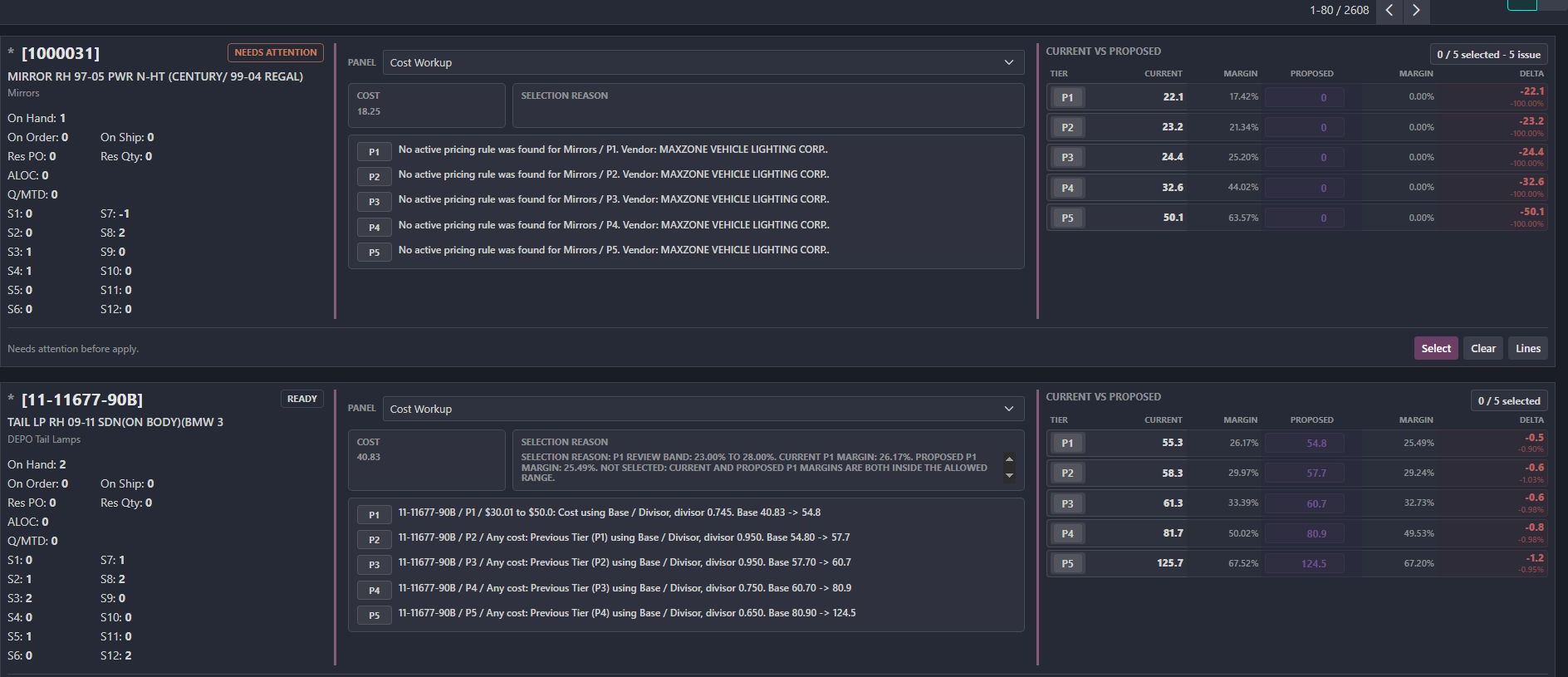
Actual pricing workspace showing product context, current and proposed tiers, and review readiness.
A few honest answers

Things worth asking before we work together.

If your question is not here, send it over. We will give you a straight answer.

What kinds of companies are the best fit?

Usually, it is a growing company where important work is spread across Odoo, spreadsheets, inboxes, and a few disconnected tools. We are most useful when the problem crosses team boundaries and cannot be fixed with one checkbox.

Is Toro only an Odoo company?

No. Odoo is an important part of our work, but the business problem comes first. We also build portals, integrations, automations, and focused tools around it when that makes the system simpler.

Can we start with one specific problem?

Yes—and that is often the best way to begin. A focused bottleneck gives us something concrete to understand, test, and improve before anyone commits to a much larger project.

What can you build beyond warehouse workflows?

Sales and approval flows, customer or vendor portals, project and service workspaces, finance controls, document processes, dashboards, integrations, and other focused business tools. Collaborative Scanning is one thing we have built, not the limit of what we can build.

How do you keep custom work maintainable?

We keep standard Odoo paths where they make sense, give custom modules clear boundaries, test realistic failure cases, and document the decisions that will matter later. We also try hard not to build things you do not need.

Do we need a finished specification before reaching out?

No. Bring the workaround, the screen recording, the spreadsheet, or the plain-English version of what is going wrong. Understanding the real process comes before deciding what should be configured or built.

You can start small

Tell us the part everyone complains about.

An ugly spreadsheet. A report nobody trusts. A portal people avoid. A half-working Odoo flow. Send us the real version.

You do not need a specification. A screen recording, a spreadsheet, or a plain-English explanation is enough.