Skip to Content
Pro-A-Motors / Purchasing · Inventory · Decision support

Purchasing catalog, forecasting and automation.

A purchasing workspace that connects product-level demand, supplier choices, commitments and arrivals to explainable order recommendations. Explore the real catalog panels, follow one SKU’s calculation and see how new purchasing, reserve calls and reserve replenishment work together.

See the real screens ↓
Choose the scope and buying routeInspect product demandReconcile commitments and arrivalsApply policy and review exceptionsKeep the reason with the result
The working interface

See it in use.

Explore 14 real views of this workflow. Select a task, show every screen, or enlarge an image to read the original controls.

Compare products with their forecast reasoning / Actual Odoo screenEnlarge screenshot ↗
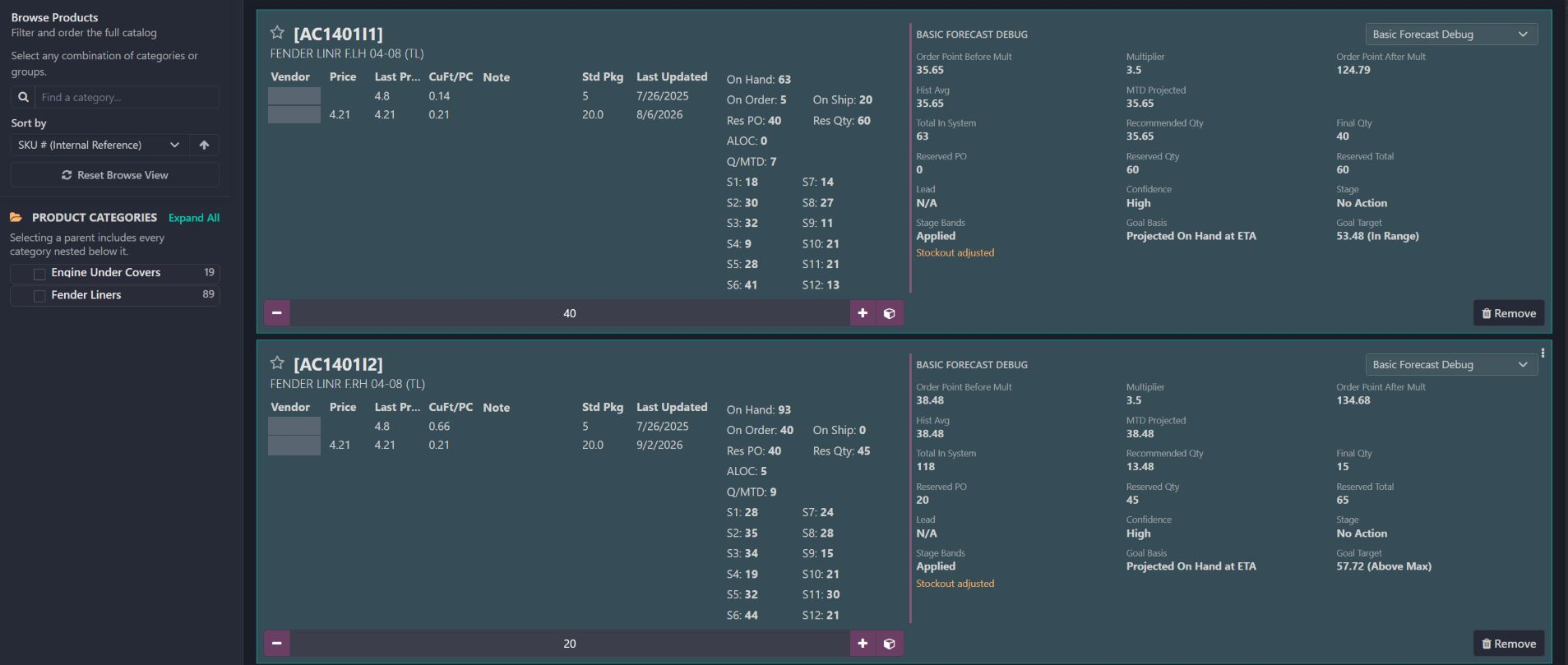
Actual purchase-order catalog with two product cards and their Basic Forecast Debug panels. The category browser, supplier-price columns, stock signals and order controls are preserved. Supplier names and the order header are protected.
01 / Buyer

Compare products with their forecast reasoning

  • Filter categories and sort the buying list without losing the product cards.
  • Read stock, incoming supply, allocations and 12 months of activity beside the supplier rows.
  • Use the debug selector to change the question being investigated; the order controls stay visible.
Follow one SKU from stock position to recommendation / Actual Odoo screenEnlarge screenshot ↗
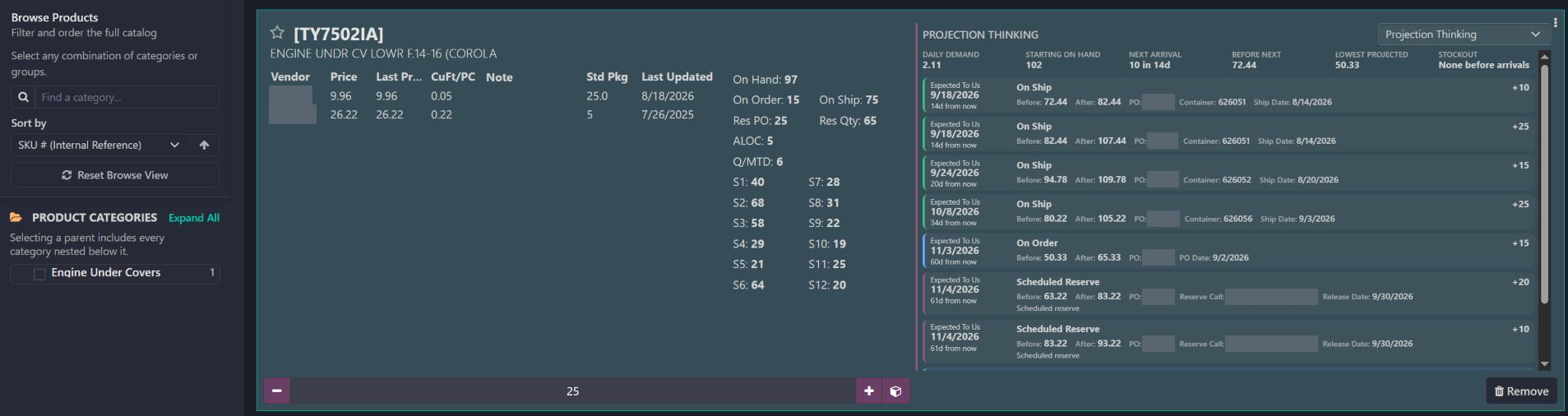
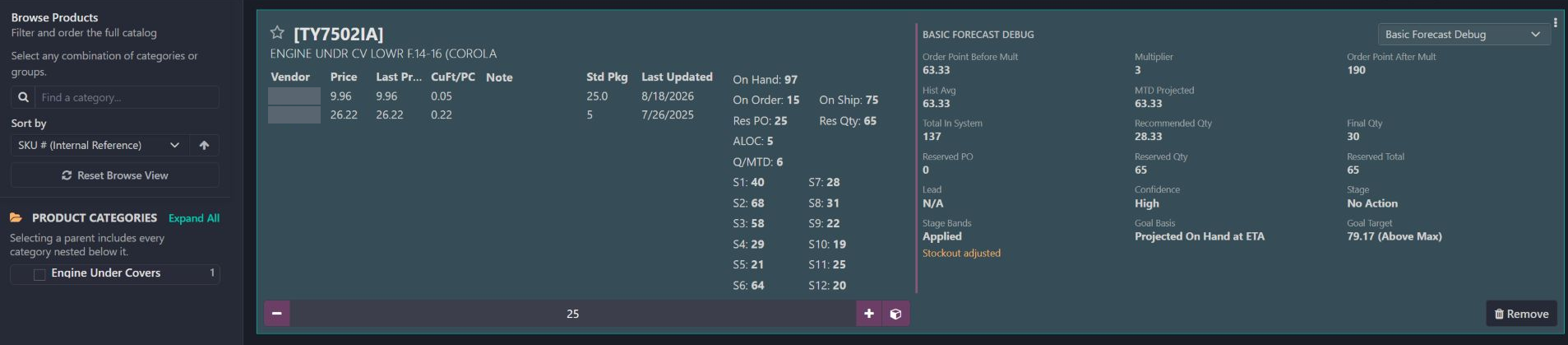
Actual TY7502IA catalog card captured September 7, 2026. Its forecast panel is tied to the existing order’s saved September 4 run. Current on-hand stock is 97, the saved run recommends 30 and the order quantity shown is 25. These values belong to different contexts.
02 / Buyer

Follow one SKU from stock position to recommendation

  • Read the engine under-cover SKU and its current commitments on the left.
  • Inspect the saved demand basis of 63.33 and the final recommendation of 30 on the right.
  • Keep the saved calculation separate from today’s stock and the actual order quantity.
See which channels are driving demand / Actual Odoo screenEnlarge screenshot ↗
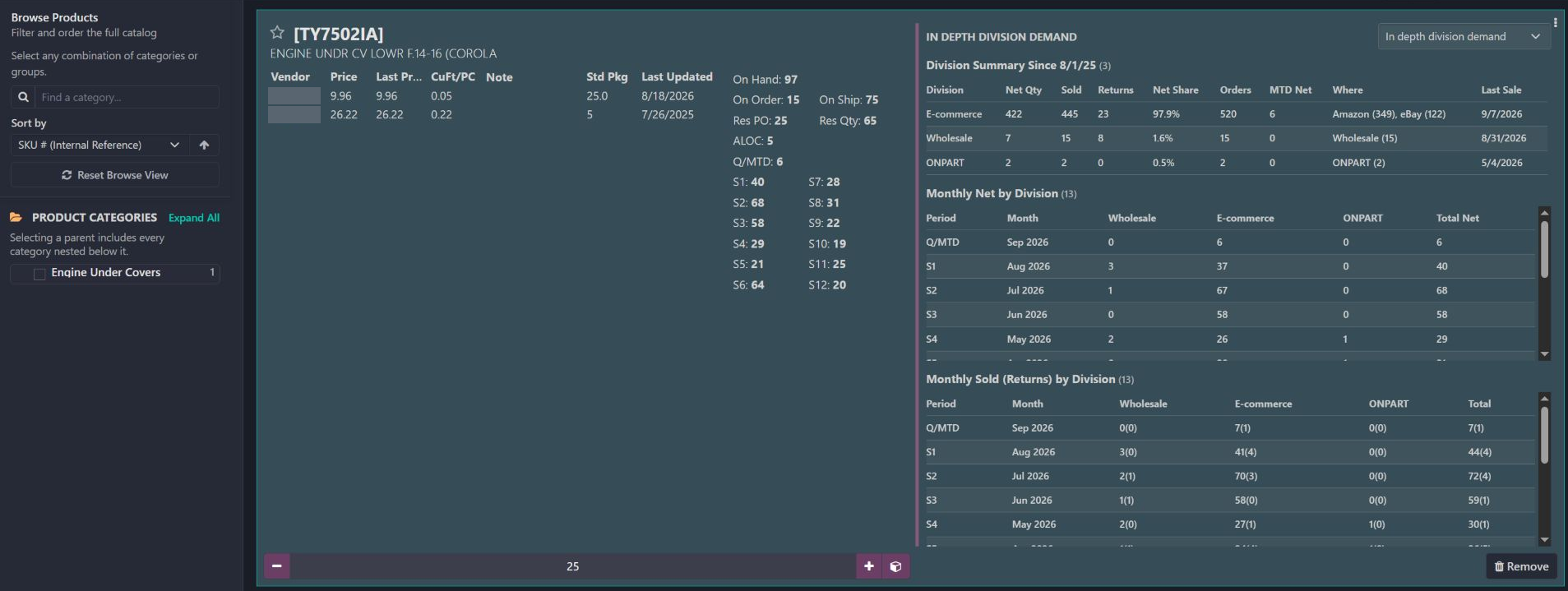
Actual In depth division demand panel for TY7502IA. The summary is labeled Since 8/1/25; the monthly tables separate net demand from sold and returned units. These are product-level unit measures, not revenue or business-wide performance.
03 / Buyer

See which channels are driving demand

  • Compare e-commerce, wholesale and other division contributions for the same product.
  • Inspect August’s 44 sold units and 4 returns, leaving 40 net units.
  • Use the monthly breakdown to see that the 40 net units include 37 e-commerce and 3 wholesale units.
Explain the five units already committed / Actual Odoo screenEnlarge screenshot ↗
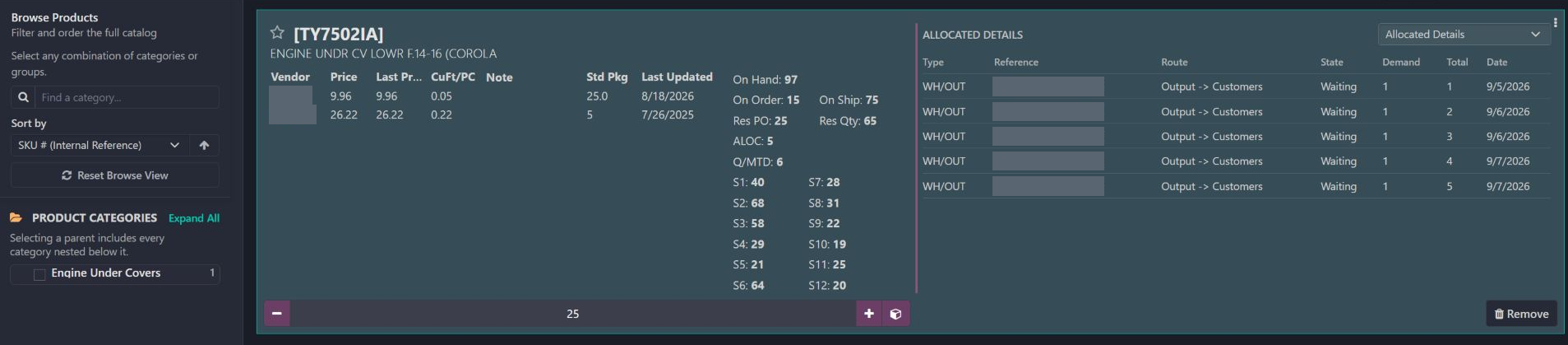
Actual Allocated Details panel for TY7502IA, showing five waiting outbound movements of one unit each. Customer order references and supplier names are covered; routes, states, dates and quantities are unchanged.
04 / Buyer

Explain the five units already committed

  • Start with the ALOC total of 5 on the product card.
  • Inspect five one-unit outbound demands and their Waiting state.
  • Keep customer commitments visible while making the replenishment decision.
Check what actually arrived / Actual Odoo screenEnlarge screenshot ↗
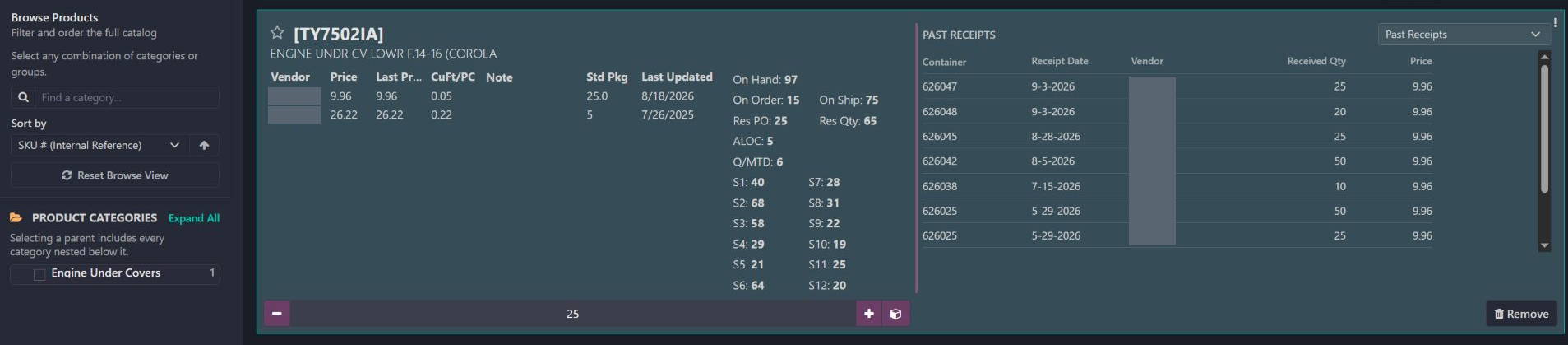
Actual Past Receipts panel for TY7502IA. The visible rows retain container references, receipt dates, received quantities and unit prices. Supplier names alone are covered within the workspace.
05 / Buyer

Check what actually arrived

  • Read the two September 3 receipts of 25 and 20 units.
  • Compare earlier receipt dates and quantities without leaving the catalog.
  • Distinguish completed receipts from supply that is still on its way.
Separate available reserve from stock already called / Actual Odoo screenEnlarge screenshot ↗
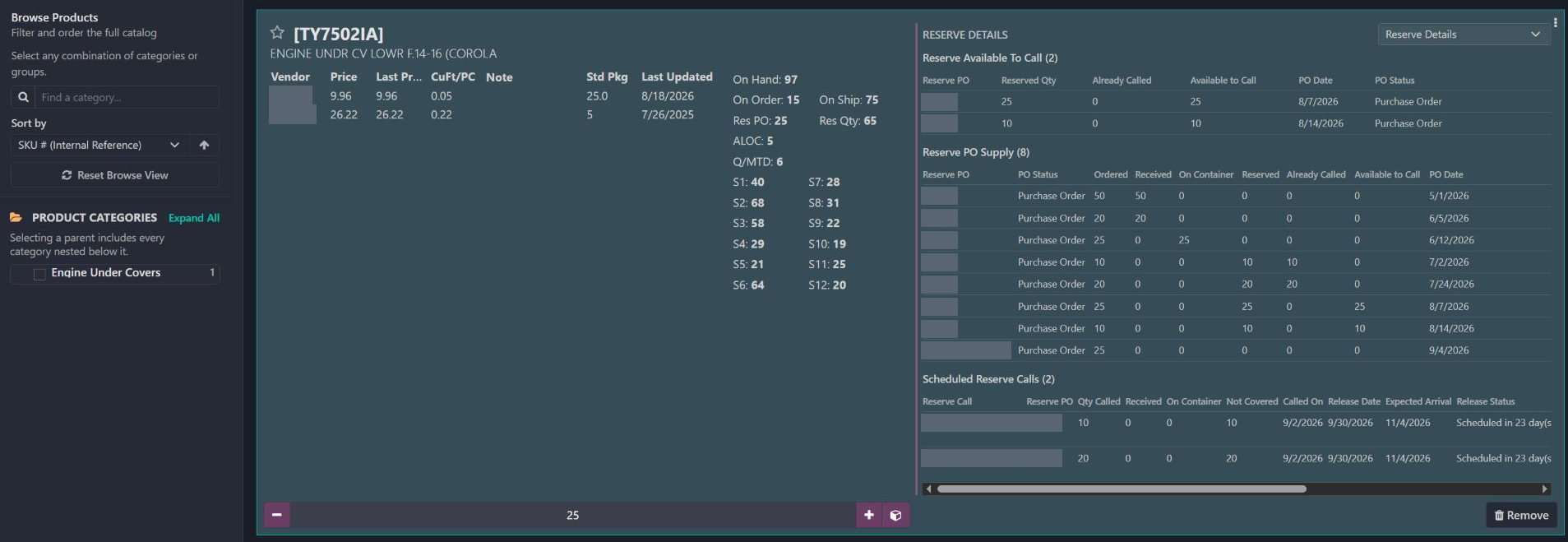
Actual Reserve Details panel for TY7502IA. It shows 25 plus 10 units available to call, reserve purchase-order supply and two scheduled call lines totaling 30. Private purchase-order and reserve-call references are covered.
06 / Buyer

Separate available reserve from stock already called

  • Read 35 units still available to call across two reserve rows.
  • Compare ordered, received, containerized, reserved and already-called quantities.
  • Inspect scheduled calls for 10 and 20 units instead of requesting the same reserve stock again.
Show exactly which months shaped the forecast / Actual Odoo screenEnlarge screenshot ↗
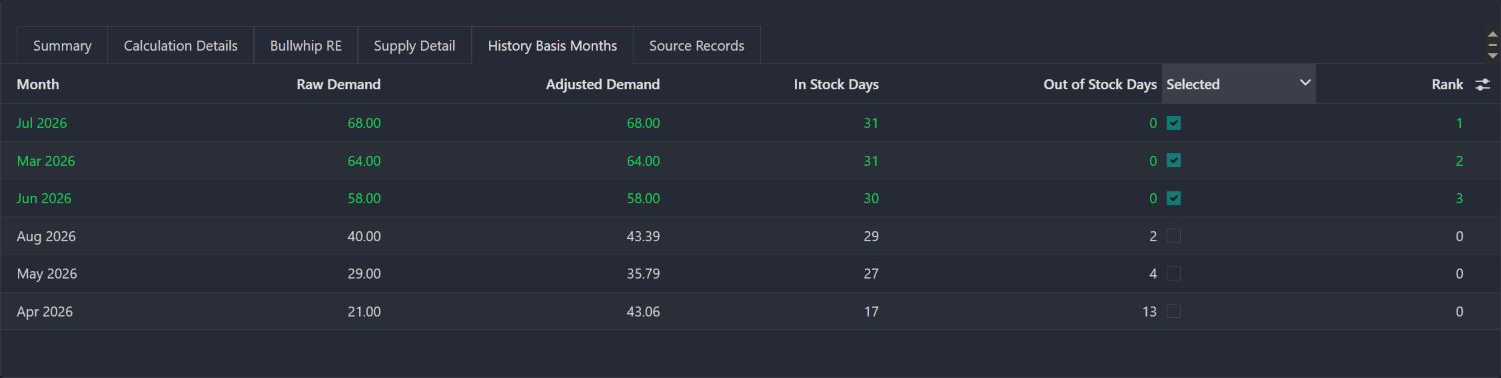
Actual History Basis Months tab from TY7502IA’s saved September 4 forecast. July, March and June are selected from the March–August pool, with adjusted demand of 68, 64 and 58. Other months show stockout adjustments but are not selected.
07 / Buyer

Show exactly which months shaped the forecast

  • Inspect all six candidate months, their raw demand and their adjusted demand.
  • See why July, March and June are the selected best three months.
  • Check low-availability months before accepting an uplift as a reliable demand estimate.
Expose the demand calculation and its assumptions / Actual Odoo screenEnlarge screenshot ↗
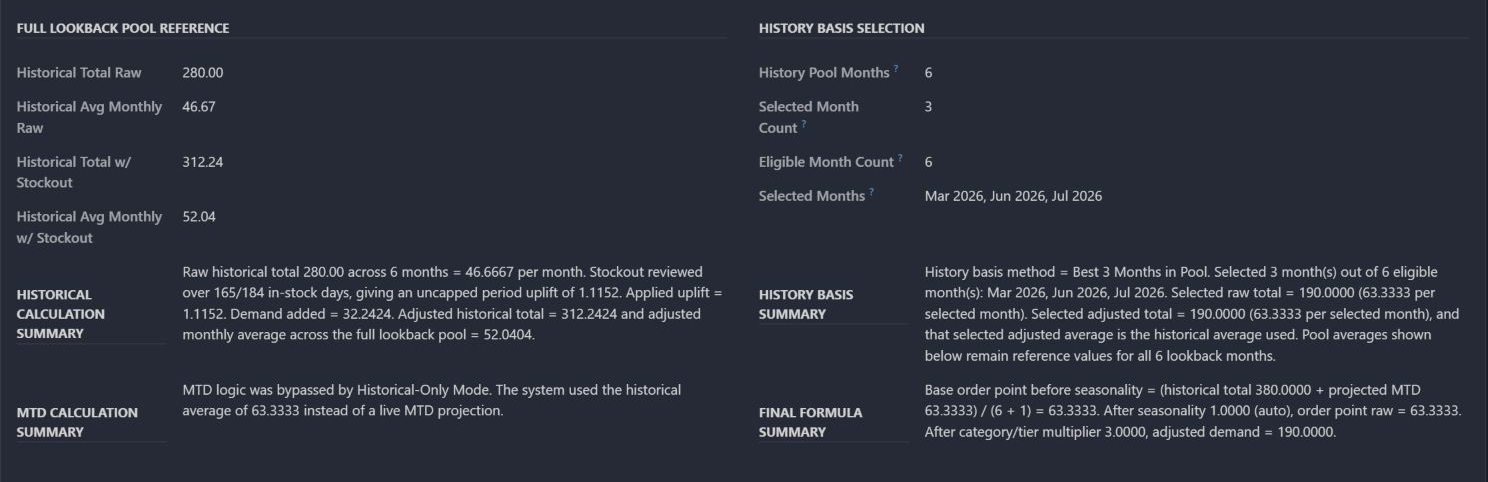
Actual written calculation summaries from TY7502IA’s saved September 4 run. The panel separates full-pool reference values from the three selected months, explains the historical-only MTD bypass and records seasonality 1 and multiplier 3 in the final formula.
08 / Buyer

Expose the demand calculation and its assumptions

  • Trace the selected average of 63.33 through the historical-only calculation.
  • Read the seasonality and multiplier settings that produce an order point of 190.
  • Keep the six-month pool totals separate from the three selected months used in this run.
Read the saved recommendation as a decision record / Actual Odoo screenEnlarge screenshot ↗
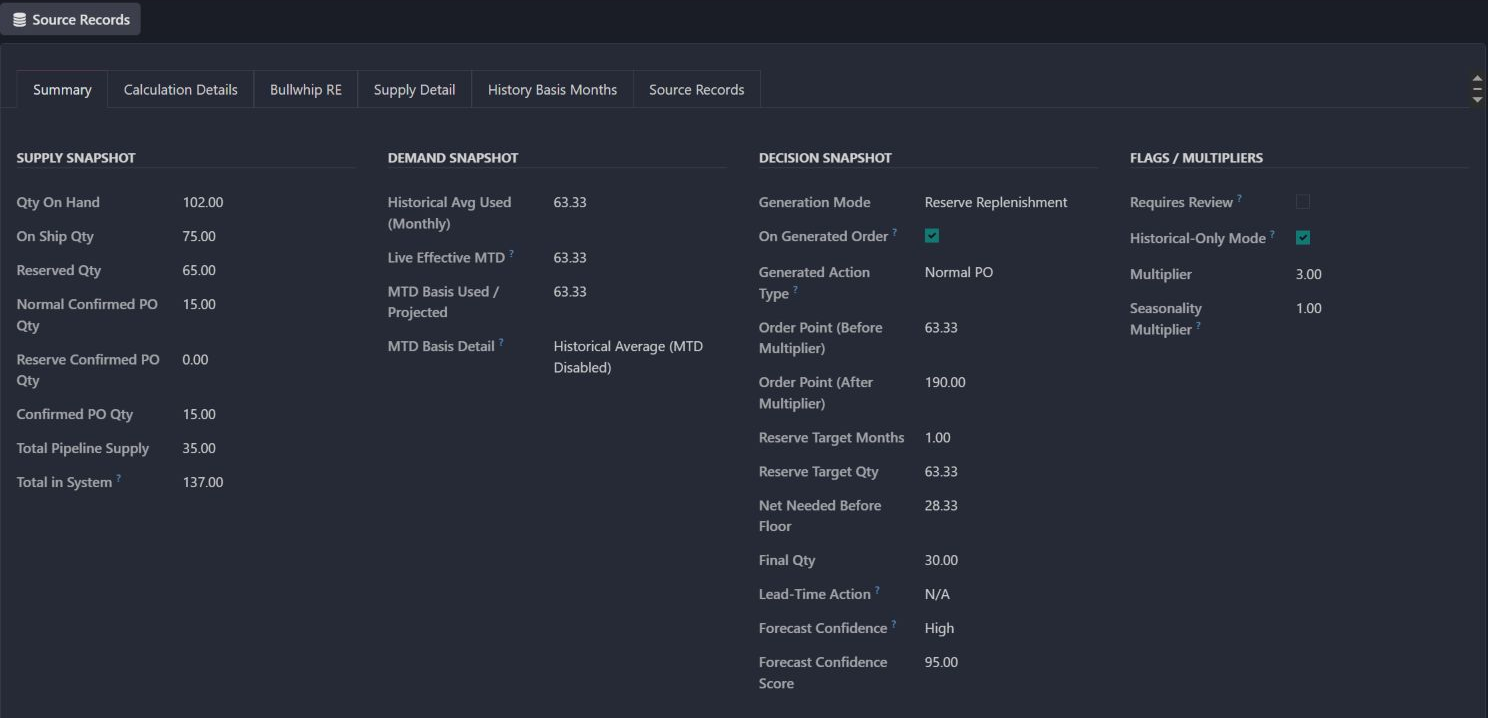
Actual Summary tab for TY7502IA’s September 4 reserve replenishment run. The saved record shows 102 on hand, 65 reserved, a 63.33 reserve target, 28.33 net needed and a final recommendation of 30. This is a saved proposal, not a newly executed order.
09 / Buyer

Read the saved recommendation as a decision record

  • Check that Generation Mode is Reserve Replenishment before interpreting its totals.
  • Read the one-month reserve target, net requirement and rounded final quantity.
  • Distinguish the purchasing recommendation from the later quantity on the order.
Reconcile supply without counting it twice / Actual Odoo screenEnlarge screenshot ↗
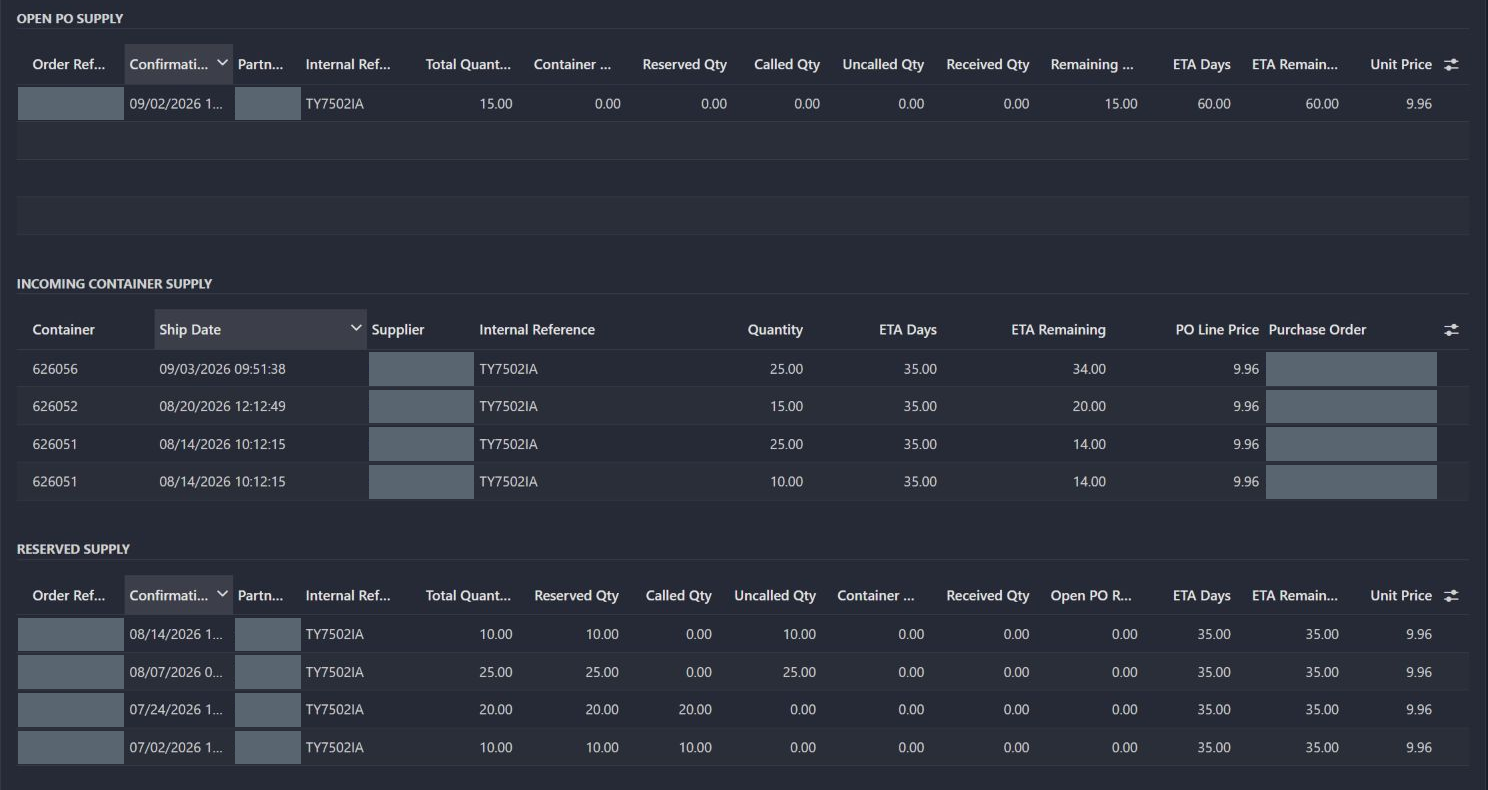
Actual Supply Details tables from the saved TY7502IA forecast. Open purchase-order supply is 15; four incoming rows total 75; four reserve rows total 65 with 30 called and 35 uncalled. Supplier names and private order references are covered.
10 / Buyer

Reconcile supply without counting it twice

  • Inspect normal open orders and incoming-container quantities in separate tables.
  • Reconcile 65 reserved units to 30 already called and 35 still available.
  • Use the uncalled reserve balance for the reserve replenishment calculation.
Explain when the incoming stock is expected to help / Actual Odoo screenEnlarge screenshot ↗
Actual Projection Thinking panel using the saved September 4 run. The timeline starts at 102 units and 2.11 units of daily demand, then shows projected stock before and after expected arrivals. Relative day labels belong to that saved run, not the September 7 capture date.
11 / Buyer

Explain when the incoming stock is expected to help

  • Follow stock consumption between expected arrivals rather than treating all incoming stock as immediately available.
  • Read the two day-14 arrivals: 10 plus 25 units lift projected stock from 72.44 to 107.44.
  • Inspect the model’s lowest projected balance of 50.33 and its no-stockout result under the saved assumptions.
Keep the purchasing policy with the resulting order / Actual Odoo screenEnlarge screenshot ↗
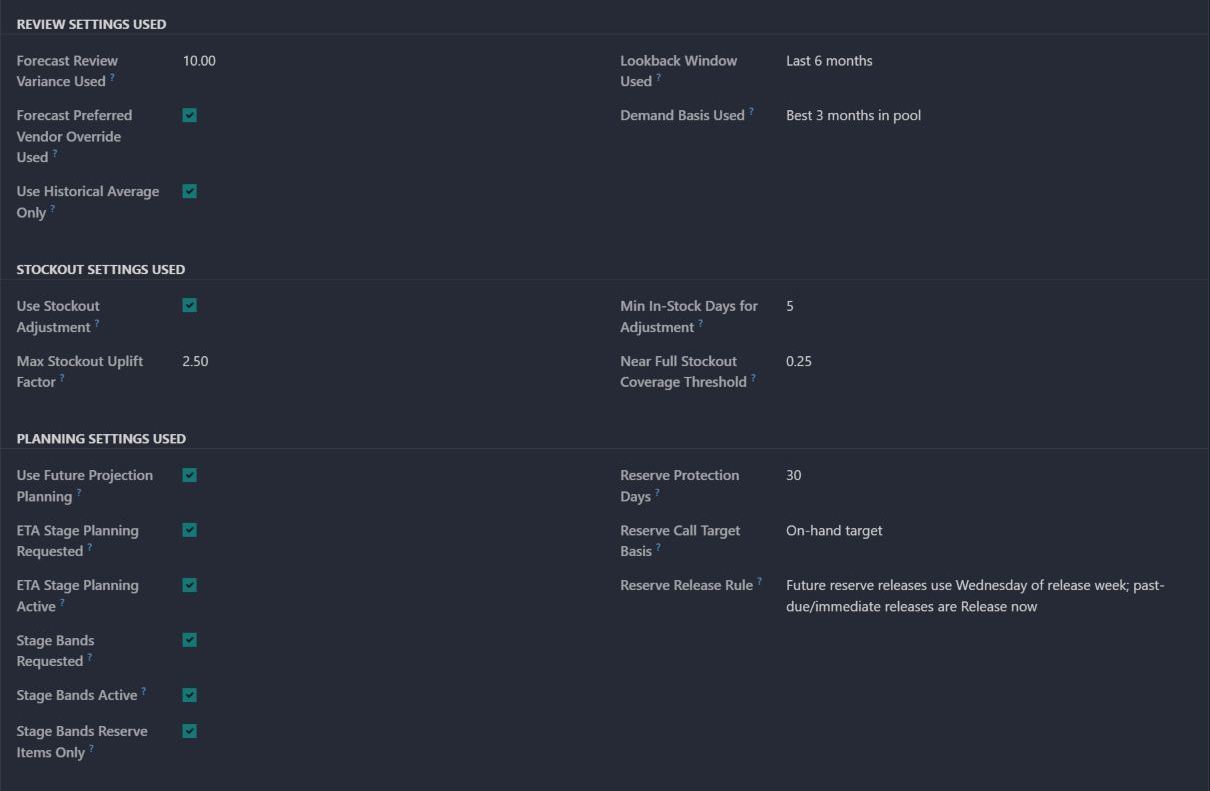
Actual Forecast Details policy section on the existing confirmed purchase order. The crop shows best three of six months, historical-only demand, review variance, stockout limits and ETA/reserve protection settings. The identifying header, generation-mode fields and chatter are outside this crop.
12 / Buyer

Keep the purchasing policy with the resulting order

  • Read the saved demand window and best-month selection on the order.
  • Inspect stockout uplift limits, minimum in-stock days and review variance.
  • Check whether ETA planning and reserve protection were requested and active.
Understand why the warehouse protection check says no action / Actual Odoo screenEnlarge screenshot ↗
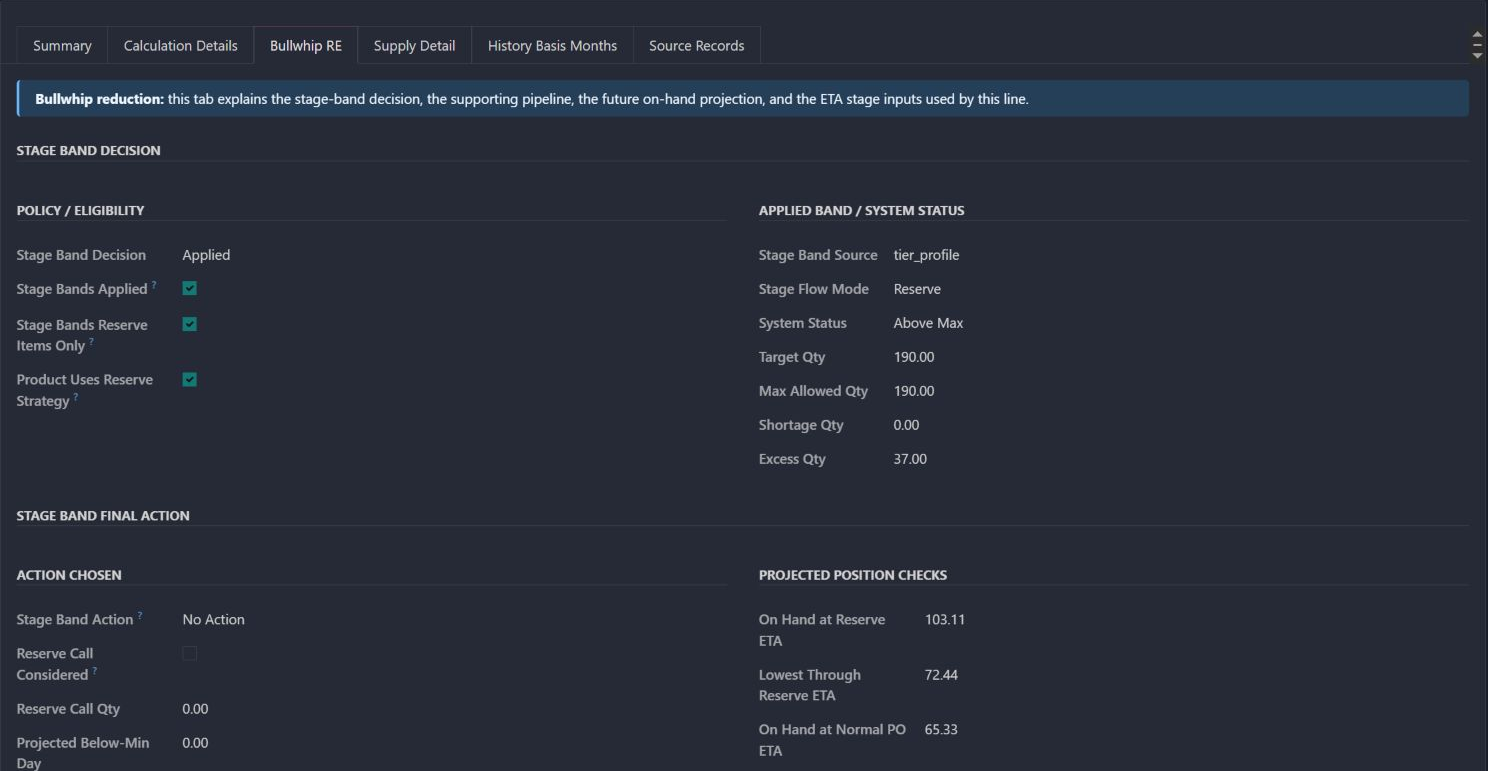
Actual Bullwhip RE stage-policy tab from the same saved run. It shows the reserve flow, Above Max system status, a 190-unit system target, a 37-unit excess and the No Action result. This stage-planning result is distinct from the reserve replenishment recommendation of 30.
13 / Buyer

Understand why the warehouse protection check says no action

  • Check that stage bands are applied and the stage flow mode is Reserve.
  • Read the 190-unit system target and 37-unit excess in this policy assessment.
  • Interpret No Action as the stage-planning result, separately from replenishing reserve.
Read the purchasing catalog / Actual Odoo screenEnlarge screenshot ↗
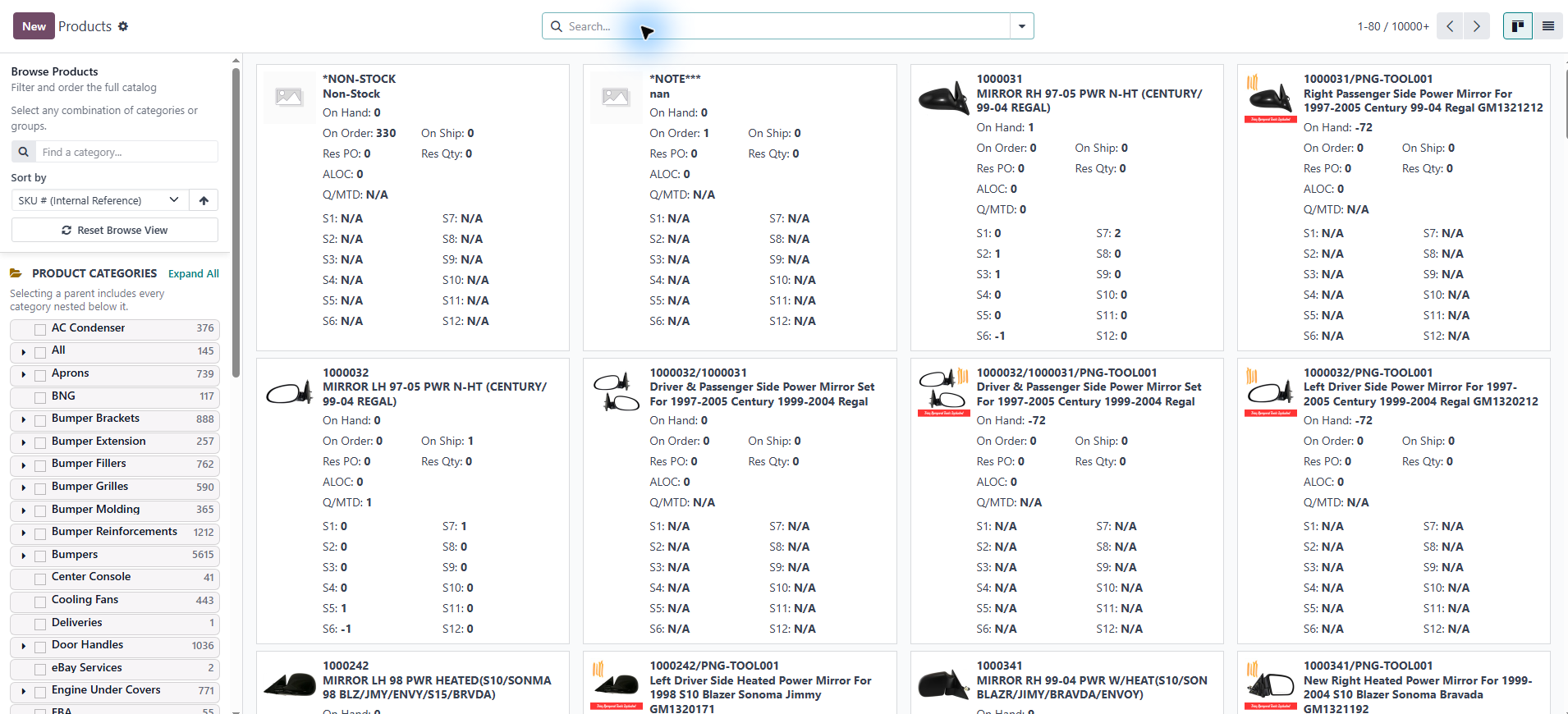
Actual purchasing catalog captured earlier from the live system. Product pictures, SKUs, categories, commitments and monthly stock/activity signals remain unchanged.
14 / Buyer

Read the purchasing catalog

  • Orient by the real product pictures and SKUs in the earlier catalog capture.
  • Compare stock, commitments and monthly activity across the buying list.
  • Use the detailed catalog views in this tour to investigate the same kinds of signals.

Actual Pro-A-Motors interface captures. Private identities and contact details are covered or outside the crop; screen data has not been replaced.

What improved

Make the buying decision explainable, from product card to order.

The business problem

A buyer needs to know more than today’s stock: what is selling, what was returned, what is already committed, what will arrive and which supplier-held units have already been called. Reconstructing those answers across separate records makes the buying decision harder to check.

What we changed

We extended the purchasing catalog with product-level demand and supply panels, then connected it to saved forecast calculations, reserve planning and the policy recorded on the order.

What the team can do now

Buyers can inspect the evidence behind a quantity, distinguish new purchasing from reserve release and replenishment, and follow a recommendation back to its selected months, supply rows and settings.

Actual saved run / September 4, 2026

Why did the system recommend 30 when 65 units were already reserved?

For engine under-cover SKU TY7502IA, 30 of the 65 reserved units had already been called. That left 35 available against a one-month reserve target of 63.33.

Reserve target
63.33 units
Uncalled reserve
35 units
Net requirement
28.33 units
Rounded proposal
30 units

What the screen shows

The resulting reserve gap is 28.33 units. The saved calculation rounds that requirement up to a multiple of five, giving a 30-unit recommendation. The supplier minimum did not change this result.

What the team does next

Inspect which reserve quantities are still available, confirm the selected demand months and check the rounding rule before accepting the recommendation.

What the next team receives

The saved forecast and order settings preserve the reasoning. The later catalog shows 25 on the existing order; the screenshots do not explain why that quantity differs from the 30-unit proposal.

Three different buying decisions

Buy it. Call it. Replenish the reserve.

A unit sitting with a supplier, a unit on a ship and a unit available in the warehouse solve different problems. The automation keeps those decisions separate.

New supply is needed

Generate a purchase recommendation

Evaluate eligible vendor products against demand, existing supply and the selected tier and ETA rules. Apply supplier minimums and rounding, then use review settings to route the proposal into an order or review.

Why we built it
A large buying list needs consistent rules while preserving a route for exceptions and buyer judgment.

Stock is already held in reserve

Call reserved stock for release

Use the uncalled reserve balance and release timing. Keep quantities already called, containerized or received distinguishable. This SKU has 35 units still available and 30 already scheduled across two call lines.

Why we built it
Calling existing stock is a different commitment from buying more. The buyer needs to avoid requesting the same reserved units again.

The reserve buffer needs refilling

Replenish the reserve

For reserve-strategy products, compare the reserve target with uncalled reserve plus reserve purchase orders. In the captured run, the 63.33 target minus 35 available leaves 28.33 to replenish, rounded to 30.

Why we built it
The supplier-held buffer can need replenishment even while warehouse stock and incoming shipments protect near-term demand.

The screens show an existing reserve replenishment run and saved reserve commitments. Normal purchase generation and review routing are supported by the implementation; no new orders or reserve calls were created for this case study.

One real product / TY7502IA

Follow the 30-unit recommendation back to its inputs.

This engine under-cover SKU was evaluated in a saved run on September 4, 2026. The run uses the best three months from a six-month pool and a one-month reserve target.

  1. 01

    Choose the demand months

    (68 + 64 + 58) ÷ 3 = 63.33 units / month

    July, March and June are the best three months in the March–August pool. Stockout adjustments are visible for other candidate months; none displaces these three selected months.

  2. 02

    Set the reserve target

    63.33 × 1 month = 63.33 units

    Reserve replenishment uses the base monthly order point and a one-month reserve target. The separate tier multiplier of three produces a 190-unit general order point; 190 is not the reserve target used here.

  3. 03

    Count only reserve still available

    65 reserved − 30 already called = 35 available

    The supply rows distinguish physical reserve from quantities already committed for release. The saved run has zero additional confirmed reserve PO supply to add to that available balance.

  4. 04

    Calculate the gap and apply the order increment

    63.33 − 35 = 28.33 → 30 units

    The system rounds the positive requirement up to the next multiple of five. The saved explanation records that the supplier minimum did not alter this result. This is the proposal, not a claim that 30 was ultimately ordered.

The catalog as a buying workspace

Ask a buying question. Open the evidence beside the product.

The catalog offers 11 detail choices. The buyer can change the panel across the catalog or inspect a product’s own panel while its stock, supplier rows and order quantity stay in view.

Why this quantity?

See the demand basis, stock considered, generation mode, recommendation and final rounded result next to the product.

Basic Forecast Debug

Where is demand coming from?

Compare divisions, channel context, monthly net units and sold-versus-returned quantities. August’s 44 sold minus 4 returns gives 40 net units for this SKU.

Division Info · In depth division demand

Which history should we trust?

Inspect the candidate months, selected months, in-stock coverage and adjustment logic. The saved run uses historical-only demand; current-month projection is another available calculation path.

MTD Calculation Details · Historical Calculation Details · History Basis Months

Which supply has already arrived?

Compare open orders and incoming stock with completed receipts. Two September 3 receipts show 25 and 20 units received for this SKU.

Supply Detail · Past Receipts

What is already committed?

Inspect five waiting outbound units, then distinguish 35 uncalled reserve units from 30 already scheduled for release.

Allocated Details · Reserve Details

Will arrivals cover the gap in time?

Follow the saved projection at 2.11 units of demand per day. Day-14 receipts add 35 units after stock falls to 72.44. The captured scenario shows no stockout before its listed arrivals; it remains dependent on those assumptions.

Projection Thinking
The scope of the system

Decisions this system handles.

A purchasing workspace that connects product-level demand, supplier choices, commitments and arrivals to explainable order recommendations. Explore the real catalog panels, follow one SKU’s calculation and see how new purchasing, reserve calls and reserve replenishment work together.

Sales history was limited by stockouts

Choose the demand basis and lookback, account for current-month activity, and apply capped stockout adjustments where the available history supports them.

The next handoff The buyer can inspect why the demand estimate differs from raw sales.

Supply is at several different stages

Separate on-hand, on-order, reserved and incoming-container quantities; use stage targets and ETA planning where configured.

The next handoff The recommendation can account for supply already committed or on its way.

The recommendation needs an exception

Apply vendor eligibility, minimum quantities, rounding and review thresholds; choose normal purchasing or reserve replenishment.

The next handoff Items can reach a purchase order or a review queue under the selected rules.

The new forecast differs from the last run

Compare saved forecast runs and inspect the calculation and source records behind changed recommendations.

The next handoff The buyer has a route back to the settings and data that changed the result.

These paths describe the implemented workflow. The captures show specific existing records; they do not demonstrate every branch being executed.
Explore the related workflows.

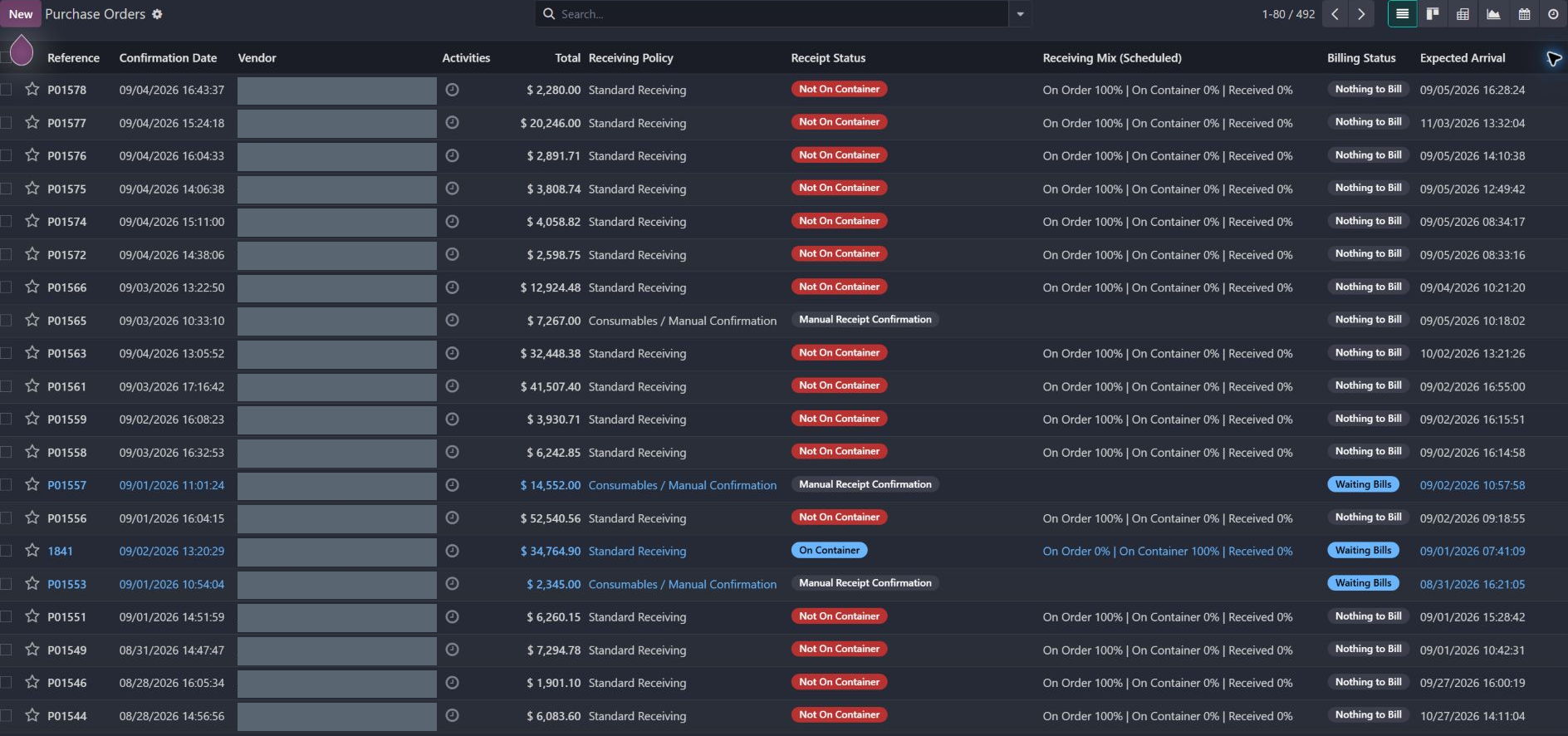
Actual purchase-order workspace with receiving policy, receipt status and the three-way progress snapshot visible. Supplier names alone are covered; quantities, values and order references remain readable.
Related workflow / Actual screen

Purchase receiving control ↗

See the purchase-order view separating on-order, container and received quantities.

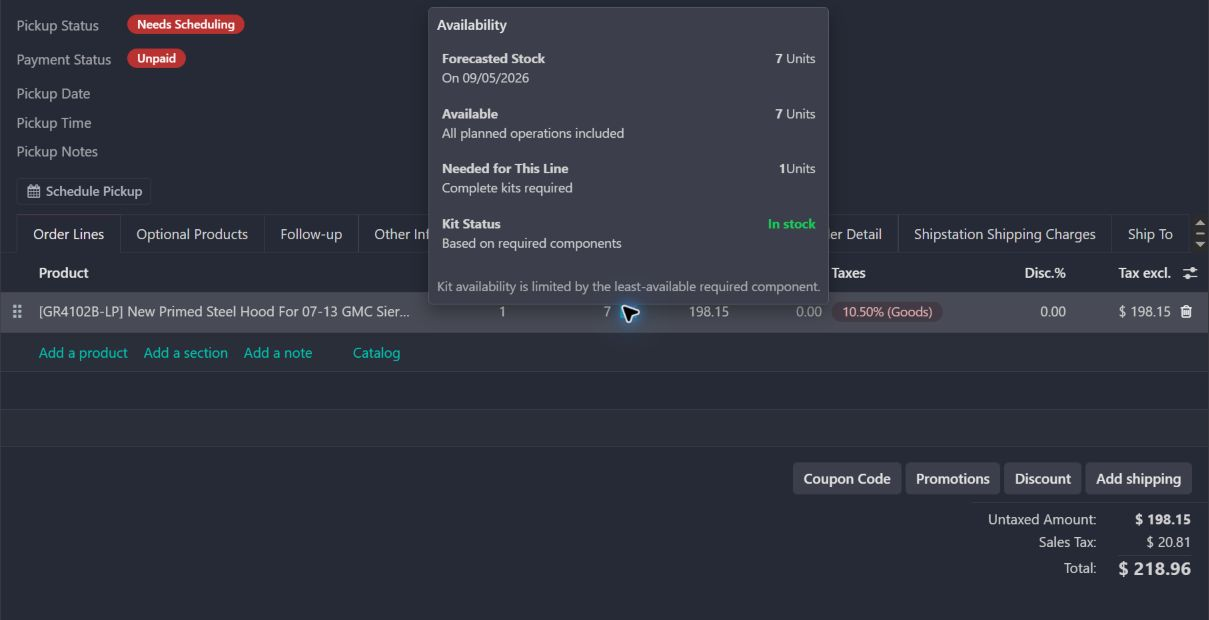
Actual availability popover on an existing quotation for kit GR4102B-LP. The screen shows seven available units and one complete kit needed. Customer identity and chatter are outside the crop; no quantities or order state were changed.
Related workflow / Actual screen

Sales stock availability ↗

Inspect the sales forecast where stock commitments affect the promise to a customer.

How the work moves

A complete purchasing workflow, with evidence at each handoff.

01

Choose the scope and buying route

Select the vendor, eligible products, demand basis and generation mode. Normal purchasing, reserve replenishment and reserve calls serve different needs.

02

Inspect product demand

Use monthly and division demand, returns, selected history months and in-stock coverage to understand the estimate.

03

Reconcile commitments and arrivals

Separate warehouse stock, open orders, incoming containers, uncalled reserve and scheduled calls. Use arrival dates when evaluating future cover.

04

Apply policy and review exceptions

Vendor eligibility, tier profiles, minimums, rounding and review variance shape which proposals become order lines and which need review.

05

Keep the reason with the result

Saved forecast lines and source details preserve the inputs; the order retains its generation settings for later inspection.

Built, used, refined

How the workflow improved over time.

  1. Change the demand basis

    Changed Q/MTD calculation from invoice-based data to sales-order data.

  2. Make held stock visible

    Added stock-lock connections to the catalog, sales and purchase automation.

  3. Bring receipt history into review

    Expanded the purchasing view with past-receipt context.

  4. Refine catalog navigation

    Added sidebar improvements to the purchasing catalog.

About these dates

Dates identify recorded implementation changes, not claimed rollout dates or measured results. Reviewed revisions: 1da6603, 6c92cfb, 26d314f, 31606db.

Build notes and background
Workflow automationOperational reportingInventory logicPurchasing policy

Make the exceptions part of the workflow.

A saved forecast has a date

The catalog combines current product information with the debug record matched to the order’s saved run. Later stock and order quantities can differ from that snapshot.

Demand adjustments have limits

Stockout uplift has a cap and minimum in-stock evidence. This run uses historical-only demand and the best three months; other settings change the calculation.

The route determines what supply counts

A reserve replenishment target is checked against available reserve and reserve purchase-order supply. A warehouse ETA check answers a different question.

Existing records are shown as captured. Private identities are covered or outside the crop. No business records were changed for this collection. Implementation history supports behavior beyond the visible screen; a still image is not an end-to-end test or a measured productivity result.

The Captivea product/purchasing customizations and standard Odoo provide the foundation. Pro-A-Motors product-detail and purchase-automation extensions add the decision context and forecasting workflow shown here.

Which handoff is slowing your team down?

Talk through your workflow →