The business problem
A confirmed purchase order does not say whether the goods are still with the supplier, already on a container, or in the warehouse. Old zero-quantity lines also made the outstanding workload harder to interpret.
See which purchases are still with the supplier, which are on a container, and which have reached the warehouse.
See the real screens ↓Explore 1 real view of this workflow. Select a task, show every screen, or enlarge an image to read the original controls.
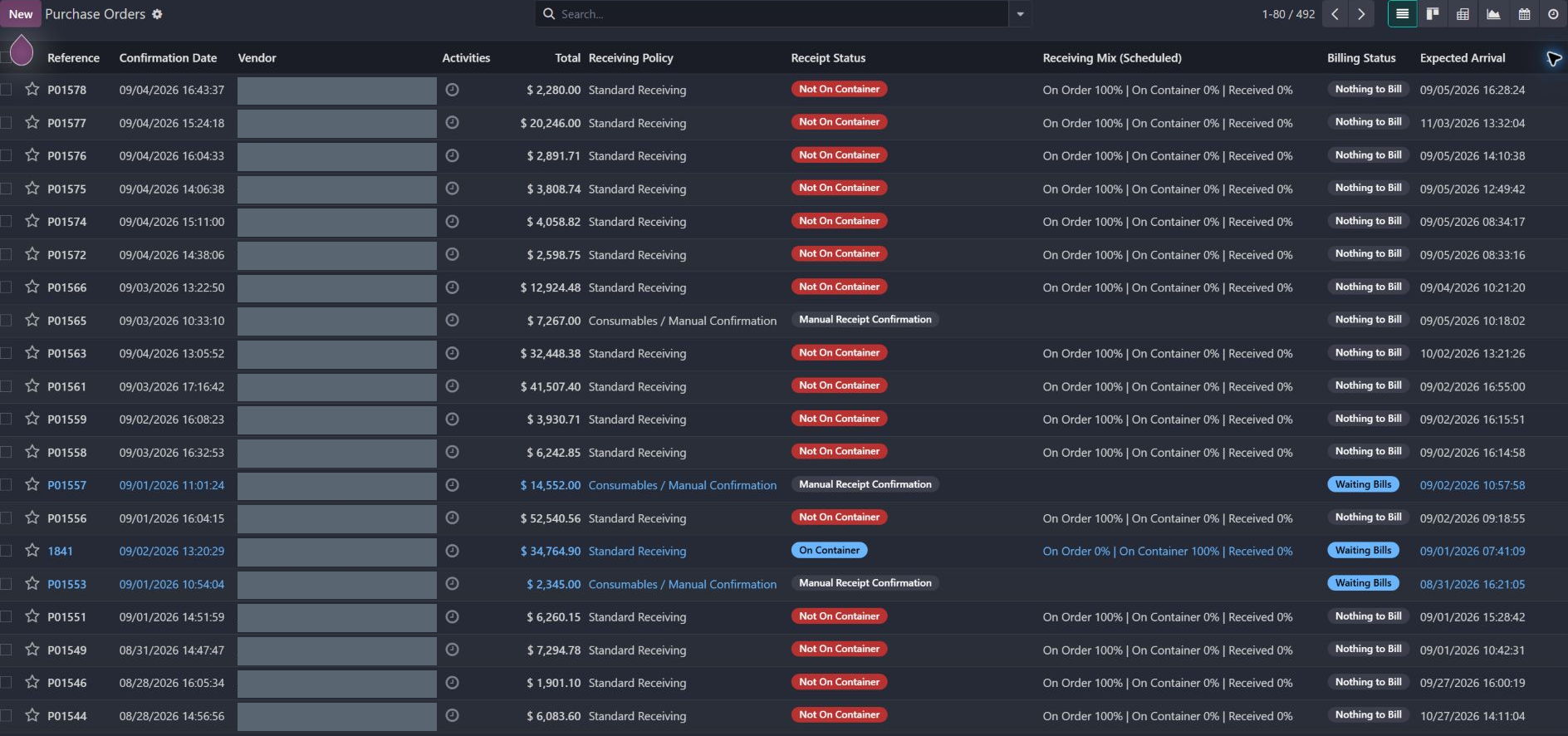
Actual Pro-A-Motors interface captures. Private identities and contact details are covered or outside the crop; screen data has not been replaced.
A confirmed purchase order does not say whether the goods are still with the supplier, already on a container, or in the warehouse. Old zero-quantity lines also made the outstanding workload harder to interpret.
Receiving classifications, a quantity-weighted supply split and guarded stale-line cleanup make outstanding purchase work clearer.
Buyers can separate supply follow-up from receiving work and explain why an order is still open.
The real list includes order 1841 with On Container status and a mix of 0% on order, 100% on container and 0% received.
The receiving list keeps container coverage beside receiving policy and billing status. These are separate decisions.
Follow the inbound shipment rather than treating the confirmed PO as warehouse stock.
Receiving retains the next physical step while purchasing can see that the outstanding quantity is already on a container.
Distinguish standard stock receipts, manual confirmation and purchases that require no warehouse receipt.
Compare the scheduled percentages still on order, on active containers and already received.
Filter outstanding orders by container coverage and inspect the lines behind a receiving status.
The cleanup considers zero-quantity age and active operational commitments before closing stale lines.
Added explicit receiving classifications and guarded cleanup of old zero-quantity purchase lines.
Added a scheduled quantity-weighted split between on-order, on-container and received stock.
Dates identify recorded implementation changes, not claimed rollout dates or measured results. Reviewed revisions: 678087c, 4f42431.
The receiving mix is scheduled data. It is not a promise of a real-time warehouse refresh.
Manual and no-receipt policies stay distinct from fully received stock.
Active moves, invoice lines, container allocations and reserve-call commitments can keep a stale line out of automatic cleanup.
Existing records are shown as captured. Private identities are covered or outside the crop. No business records were changed for this collection. Implementation history supports behavior beyond the visible screen; a still image is not an end-to-end test or a measured productivity result.
Built on Captivea CAP modules and Odoo. This case describes the subsequent Pro-A-Motors extensions and refinements recorded in the reviewed repository; it does not attribute the original CAP implementation to Toro.
Separates physical receipt progress from order confirmation.
Shows buyers which outstanding quantities are already on containers.