The business problem
Physical on-hand stock can include quantities already promised or intentionally held. Kits add another layer: a sales line needs to reflect the components that can actually support it.
Give sales a usable stock figure that accounts for existing commitments, held stock and the parts needed to make a complete kit.
See the real screens ↓Explore 1 real view of this workflow. Select a task, show every screen, or enlarge an image to read the original controls.
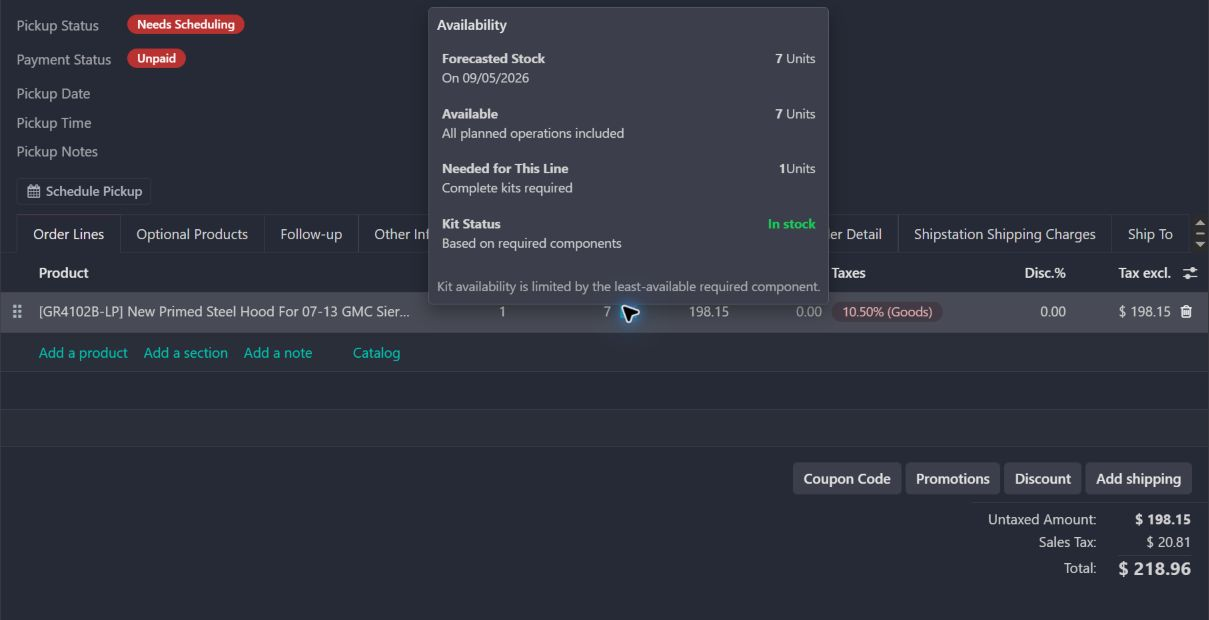
Actual Pro-A-Motors interface captures. Private identities and contact details are covered or outside the crop; screen data has not been replaced.
Physical on-hand stock can include quantities already promised or intentionally held. Kits add another layer: a sales line needs to reflect the components that can actually support it.
Sales indicators use shared availability calculations, including stock locks and the components that support a kit.
Sales can review a stock promise with the warehouse’s restrictions still attached to the number.
The existing GR4102B-LP quotation line opens a native availability panel. It shows the complete-kit requirement beside available stock and explains that the least-available required component limits kit availability.
The same panel shows forecasted stock, available stock and the line requirement. Those quantities remain visible in the capture.
Use the availability explanation to assess this line, then account for the rest of the order before confirming a promise.
Sales and warehouse staff share an explanation of what the kit quantity represents. The capture observes a quotation; it does not demonstrate reservation or delivery.
Read availability for the warehouse serving this order.
Account for stock already reserved or held.
See how the least-available required component limits the number of kits.
Consider repeated product lines and quantities before promising stock.
Brought sales availability into line with the shared stock calculation.
Extended the stock-lock context into kit availability and sales indicators.
Refined the availability widget so kit lines expose the stock context staff need.
Dates identify recorded implementation changes, not claimed rollout dates or measured results. Reviewed revisions: 58dfa3c, 51f57ac, b9555d1.
Reserved and actively locked quantities must not look freely available.
A confirmed order can include its own reserved units when showing what is available for that order.
This case describes calculation and presentation logic; it is not a stock adjustment.
Existing records are shown as captured. Private identities are covered or outside the crop. No business records were changed for this collection. Implementation history supports behavior beyond the visible screen; a still image is not an end-to-end test or a measured productivity result.
Built on Captivea CAP modules and Odoo. This case describes the subsequent Pro-A-Motors extensions and refinements recorded in the reviewed repository; it does not attribute the original CAP implementation to Toro.
Carries reservations and stock locks into commercial decisions.
Helps sales explain what an order can actually draw from stock.