The business problem
One sale can have picks, outgoing deliveries, backorders and return or exchange transfers. Opening whichever record happens to match first can send an operator into the wrong job.
Help warehouse staff get to the right picking task, see the parts and locations, and find the related customer dispatch.
See the real screens ↓Explore 1 real view of this workflow. Select a task, show every screen, or enlarge an image to read the original controls.
Actual Pro-A-Motors interface captures. Private identities and contact details are covered or outside the crop; screen data has not been replaced.
One sale can have picks, outgoing deliveries, backorders and return or exchange transfers. Opening whichever record happens to match first can send an operator into the wrong job.
Order scanning follows explicit choices across picks, deliveries, backorders and returns, with navigation into the relevant warehouse task.
Operators have a predictable next step while return and exchange work keeps its own identity.
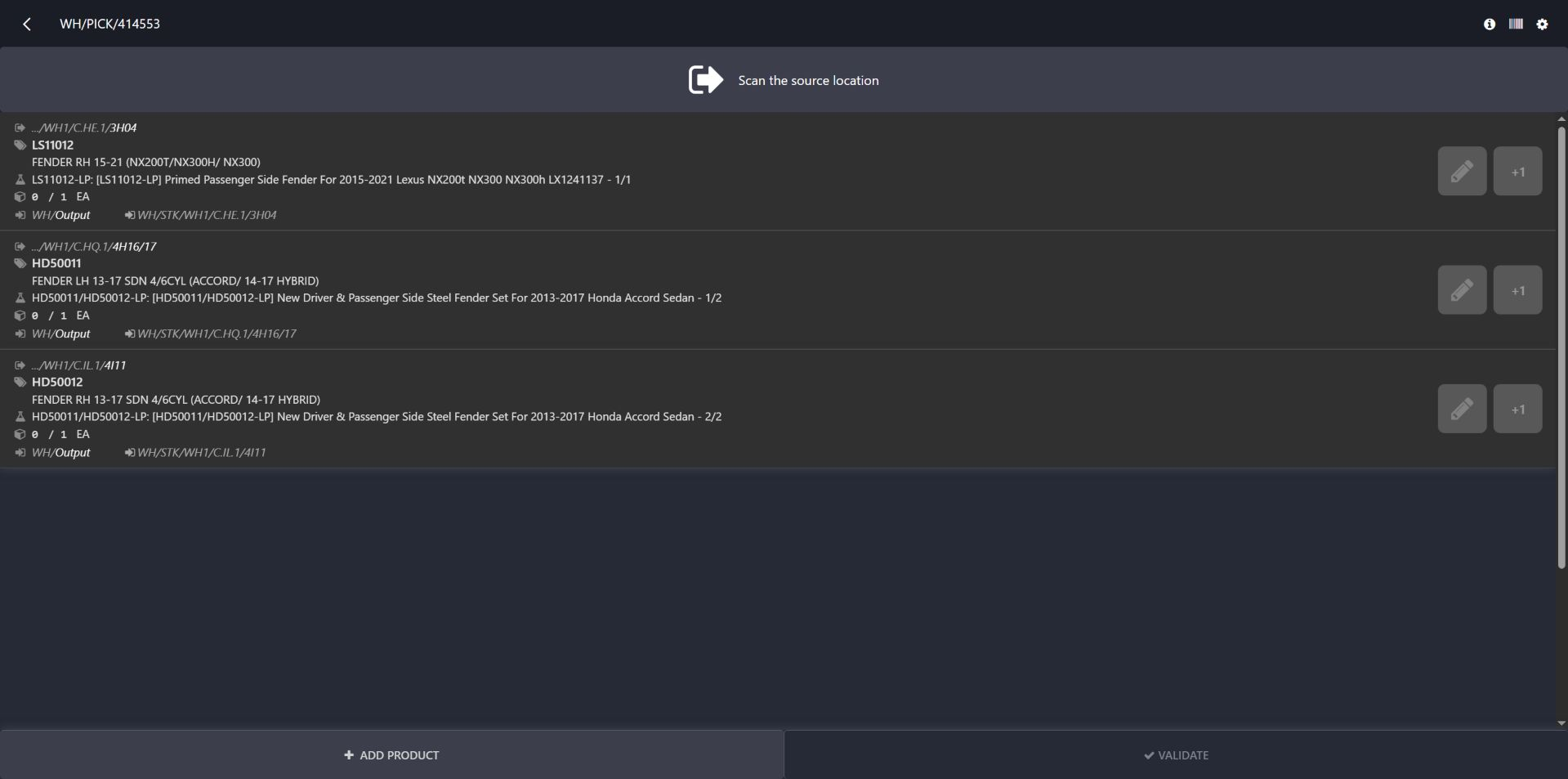
The existing picking task opens with a source-location prompt. Each product row carries a location, required quantity and kit context.
The screenshot shows the actual picking workspace, including the paired HD50011 and HD50012 kit labels.
Identify the correct location and part before recording the pick.
Our routing refinements help operators find the relevant pick and related dispatch. This image shows the picking workspace; it does not demonstrate a barcode scan or completed delivery.
Use an order or transfer reference to reach its warehouse work.
Prioritize the relevant open picking task.
Use the location, part and quantity information to carry out the physical pick.
Open the eligible related delivery when it is available.
Added deterministic selection across picks, backorders, outgoing deliveries and RMA work, plus customer-out navigation.
Removed the no-backorder button from the customized confirmation view; the underlying server method still exists.
Dates identify recorded implementation changes, not claimed rollout dates or measured results. Reviewed revisions: f96de7c, cd707bf.
A completed delivery is a fallback only when no open operation remains.
Return and replacement markers affect selection instead of being treated as normal original delivery work.
Opening the next record does not itself validate a transfer or move stock.
Existing records are shown as captured. Private identities are covered or outside the crop. No business records were changed for this collection. Implementation history supports behavior beyond the visible screen; a still image is not an end-to-end test or a measured productivity result.
Built on Captivea CAP modules and Odoo. This case describes the subsequent Pro-A-Motors extensions and refinements recorded in the reviewed repository; it does not attribute the original CAP implementation to Toro.
Connects a scanned sales order to the next relevant warehouse operation.