The business problem
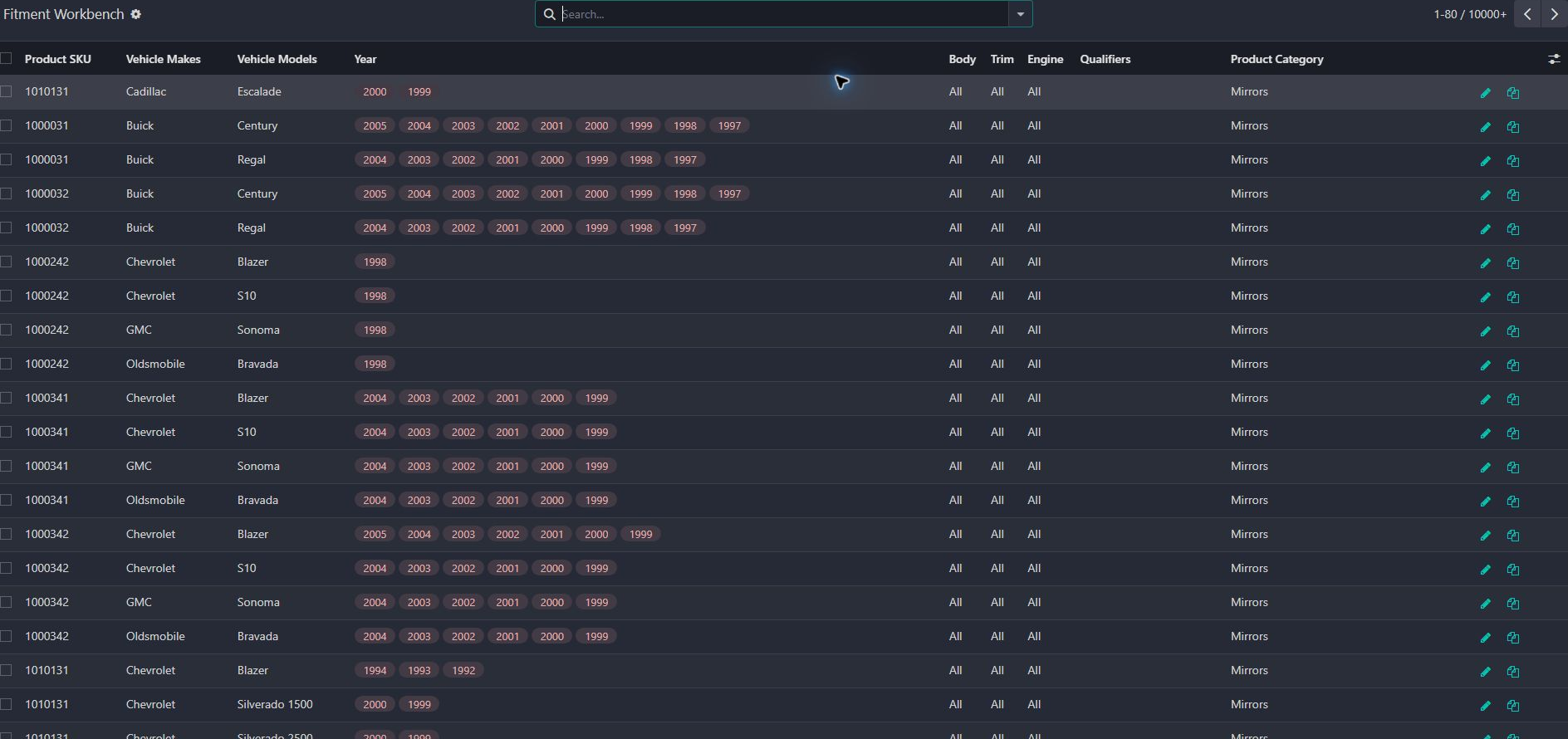
Compatibility data existed, but it was difficult to inspect and maintain at product scale. The workbench was created to make the mapping visible before it reaches search and the storefront.
Year, make, and model are only the beginning. A maintainable fitment system has to manage the product relationship, qualifiers, imports, categories, publishing, and the shopper’s current vehicle.
See the real screens ↓Explore 2 real views of this workflow. Select a task, show every screen, or enlarge an image to read the original controls.
Actual Pro-A-Motors interface captures. Private identities and contact details are covered or outside the crop; screen data has not been replaced.
Compatibility data existed, but it was difficult to inspect and maintain at product scale. The workbench was created to make the mapping visible before it reaches search and the storefront.
A dedicated workbench exposes make, model, year and other compatibility attributes for product-level maintenance.
The catalog team can manage the mappings while shoppers get a cleaner path from “what fits?” to an available product.
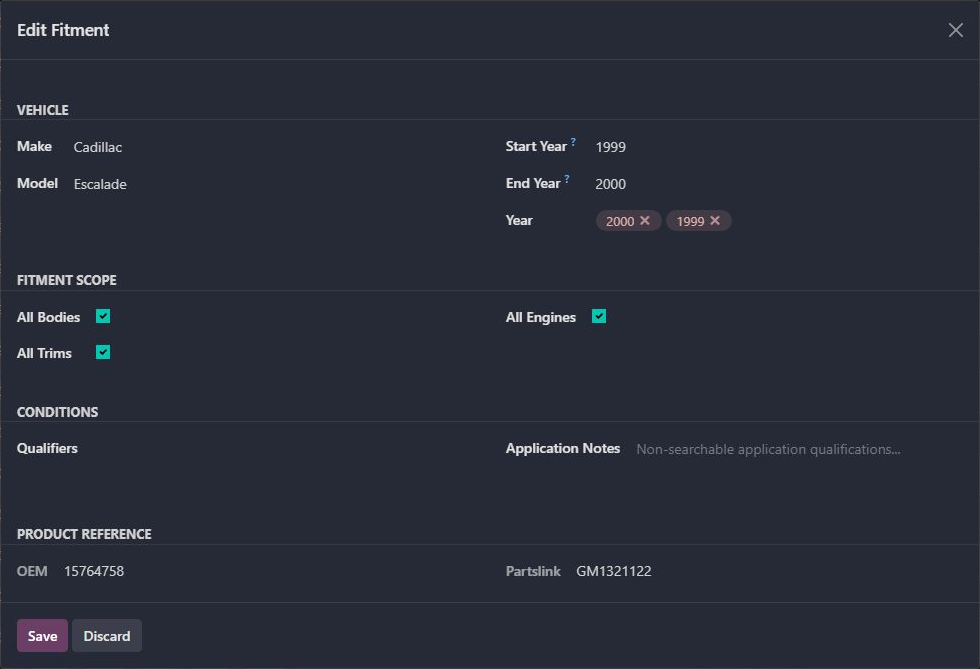
The inspected mapping shows Cadillac Escalade, start year 1999 and end year 2000, with All Bodies, All Trims and All Engines enabled.
The editor exposes the selected years, scope switches, qualifiers, application notes, OEM and Partslink. It was closed without saving changes.
Review the mapping’s scope and any qualifiers before changing compatibility. These are existing catalog values, not a fitment recommendation for a vehicle.
Catalog staff retain a mapping whose year coverage and restrictions can be inspected and maintained.
Each product relationship can express make, model, year range, body, trim, engine, and qualifiers.
Bulk data and legacy mappings enter through controlled paths instead of bypassing the model.
Publishing, categories, stock messaging, and year restrictions prevent misleading choices.
The selected vehicle follows search, categories, and product decisions until the shopper changes it.
Added year restrictions to the website picker.
Kept the vehicle year through the search flow.
Refined persistence of the shopper’s fitment selection.
Dates identify recorded implementation changes, not claimed rollout dates or measured results. Reviewed revisions: f472edc, f38797a, 62f1f93.
All Bodies, All Trims and All Engines are visible choices, not missing labels.
Application notes and searchable compatibility restrictions serve different purposes.
Year, make and model criteria are checked against the same fitment detail row by the catalog search extension.
Existing records are shown as captured. Private identities are covered or outside the crop. No business records were changed for this collection. Implementation history supports behavior beyond the visible screen; a still image is not an end-to-end test or a measured productivity result.
Substantially extended from an existing commercial automotive-fitment foundation and standard Odoo product and website-commerce features. Toro’s work is the maintenance workflow, safeguards, data handling, and storefront behavior described here.
Connects vehicle selection with compatible parts so product discovery starts with the customer's vehicle.