The business problem
One generic document cannot serve every sales channel or freight handoff. Background PDF generation also should not make an order look as though someone deliberately printed it.
Give each sales team the right paperwork, including freight packing lists without prices and a record of deliberate downloads.
See the real screens ↓Explore 1 real view of this workflow. Select a task, show every screen, or enlarge an image to read the original controls.
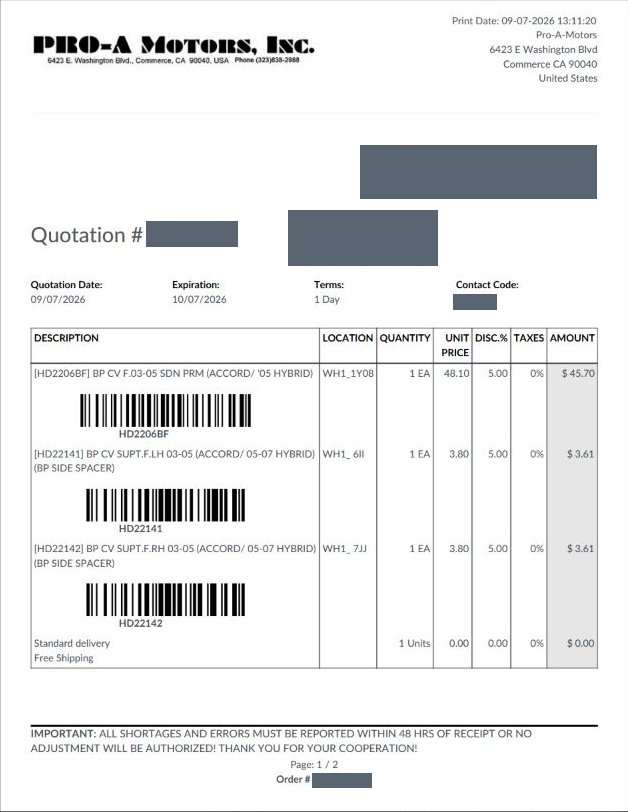
Actual Pro-A-Motors interface captures. Private identities and contact details are covered or outside the crop; screen data has not been replaced.
One generic document cannot serve every sales channel or freight handoff. Background PDF generation also should not make an order look as though someone deliberately printed it.
Channel layouts, freight packing-list behavior and print tracking were brought into maintained report logic.
Staff can select the right operational document while print metadata has a clearer meaning.
The attached quotation lists a bumper cover and two supports, with a barcode and warehouse location for each product.
The first page retains quantities, unit prices, discounts and line amounts. It is a quotation attachment created before confirmation, not the separate price-free freight packing list.
Inspect the saved document for the customer’s channel. Use the appropriate operational report for a freight handoff.
The recipient receives identifiable products and commercial detail; fulfillment can read the accompanying location references.
Use the document layout appropriate to the team and customer.
Provide the supported packing list without commercial prices.
Retain the appropriate quotation or invoice for the recipient.
Distinguish a deliberate document download from an automatically prepared attachment.
Refined last-print behavior and report handling.
Added price-free freight packing-list behavior for interactive printing.
Moved sales report behavior into module-managed layouts and team selection.
Dates identify recorded implementation changes, not claimed rollout dates or measured results. Reviewed revisions: 26bfff4, 716d802, 898aa1e.
The automatic team print action rejects incompatible report groups instead of silently combining unlike layouts.
Mail attachment generation and background rendering do not establish a deliberate user download.
Best-effort timestamp updates avoid waiting on locked order rows; a skipped stamp is not a failed order.
Existing records are shown as captured. Private identities are covered or outside the crop. No business records were changed for this collection. Implementation history supports behavior beyond the visible screen; a still image is not an end-to-end test or a measured productivity result.
Built on Captivea CAP modules and Odoo. This case describes the subsequent Pro-A-Motors extensions and refinements recorded in the reviewed repository; it does not attribute the original CAP implementation to Toro.
Gives freight dispatch a focused packing document.
Keeps commercial information and print history in the appropriate context.
Adapts sales documents to the customer channel and recipient.