The business problem
A management report needs to explain how income before taxes becomes net profit. Hiding that relationship inside a broad expense total makes the report harder to inspect.
Show management the path from income before taxes to final net profit, with tax detail they can inspect.
See the real screens ↓Explore 1 real view of this workflow. Select a task, show every screen, or enlarge an image to read the original controls.
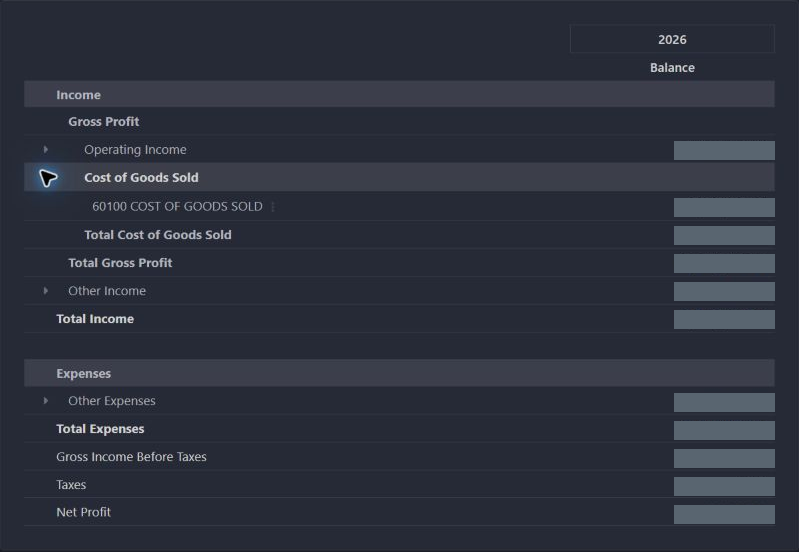
Actual Pro-A-Motors interface captures. Private identities and contact details are covered or outside the crop; screen data has not been replaced.
A management report needs to explain how income before taxes becomes net profit. Hiding that relationship inside a broad expense total makes the report harder to inspect.
The report separates income before taxes, taxes and net profit, with account groupings available for inspection.
Finance can review a clearer report structure and trace the tax section to its account grouping.
The actual report shows an expanded cost-of-goods grouping and separate lines for income before taxes, taxes and net profit.
The view is limited to posted entries. Its warning identifies unposted entries in or before the period; these are not included in the shown result.
Check the period, posting filter and contributing account groups before using the report.
Management receives a report whose structure explains how the result is assembled.
Review the business’s profit and loss in one place.
Read the result before income tax expenses are included.
Expand the tax section to understand the accounts behind it.
Follow the report through to net profit.
Added account-backed P&L lines and formula configuration for income taxes.
Dates identify recorded implementation changes, not claimed rollout dates or measured results. Reviewed revisions: 022e3f7.
This is software report engineering, not an assessment of tax liability or accounting-policy compliance.
The tax section relies on the configured account type.
The configuration checks for the expected aggregation lines and logs a warning if they are unavailable.
Existing records are shown as captured. Private identities are covered or outside the crop. No business records were changed for this collection. Implementation history supports behavior beyond the visible screen; a still image is not an end-to-end test or a measured productivity result.
Built on Captivea CAP modules and Odoo. This case describes the subsequent Pro-A-Motors extensions and refinements recorded in the reviewed repository; it does not attribute the original CAP implementation to Toro.
Makes the report’s before-tax, tax and net-profit relationship visible.
Demonstrates account-backed report expressions and drill-down structure.